Published Sep 5, 2026 · 8 min read
The Database Connection Setting That Silently Throttles Your Writes
Part 3 of the Scaling CouchDB to 1 Million Requests Per Minute series - A config line about connection counts pinned our TCP receive window to 8,192 bytes, turning a single write into thousands of round trips.
We tuned CouchDB’s HTTP listener for connection capacity. More acceptors, a bigger accept queue, a higher connection ceiling. The kind of change you make when external devices like POS start to increase with merchant count.
Then our p90 write latency started touching up to 2 minutes per write request.
Nothing was saturated. CPU, memory and disk were fine. Every slow request came back 2XX. Chasing it, we found the line we’d written about connection counts had pinned every socket’s TCP receive window to 8 KB.
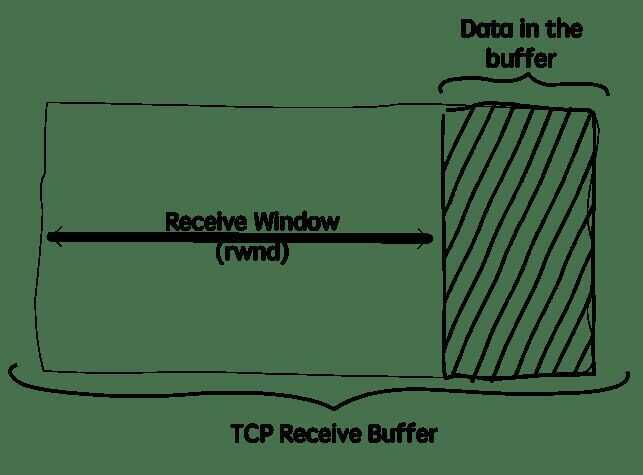
TCP can’t send more than one window of data per round trip. So an 8 KB window puts a hard ceiling on how fast one connection can push data into CouchDB, whatever the link underneath is capable of.
To see how small that window is, here it is against the ones we should have had:
TCP receive window

  ~6 MB    what Linux can autotune to     ################################
  256 KB   what we shipped as the fix     #
  8 KB     what we actually had           .
Every write crossed the wire 8 KB at a time, stopping for a round trip between each piece. A 40 MB document took 4,883 of those round trips instead of 153.
What We Set
Our clusters sit behind a lot of external consumers like our POS and also behind of internal consumers from our EKS cluster. Many connections, constant churn. So we tuned the listener for that:
[chttpd]
server_options = [{backlog, 128}, {acceptor_pool_size, 16}, {max, 8192}]
Three settings, one concern:
backlogis the kernel accept queue.acceptor_pool_sizeis how many processes wait on the listening socket.maxis the cap on concurrent connections.
None of it is about throughput. It’s about how many connections we take, not how fast each one runs.
What That Key Also Carries
Here’s CouchDB’s default for the same key, from src/chttpd/src/chttpd.erl in apache/couchdb, at the 3.3.3 tag we run:
-define(DEFAULT_SERVER_OPTIONS, "[{recbuf, undefined}]").
So server_options isn’t only about connections. It’s also where CouchDB sets its receive-buffer policy. And that policy is deliberate: undefined means don’t pin the buffer, let the OS decide.
CouchDB reads that key with a plain config lookup. It returns your value or the default. Never both.
Which means server_options is just one config string, not a list you add settings to. CouchDB parses whichever string wins and uses it as the complete option list.
So the substitution is literal:
CouchDB's default value for the key
  [{recbuf, undefined}]

what we wrote in our ini
  [{backlog, 128}, {acceptor_pool_size, 16}, {max, 8192}]

what CouchDB actually uses
  [{backlog, 128}, {acceptor_pool_size, 16}, {max, 8192}]
With no recbuf config in the string, the choice falls to MochiWeb.
Absent Is Not Undefined
MochiWeb is the Erlang library CouchDB embeds to serve its HTTP API. It owns the listening socket and the options set on it, so anything CouchDB doesn’t specify, MochiWeb decides.
When recbuf is missing, MochiWeb uses the default in its own record, from mochiweb_socket_server.erl at v3.2.0, the version CouchDB 3.3.3 depends on:
-record(mochiweb_socket_server, { ..., recbuf=?RECBUF_SIZE, ... }).
MochiWeb’s own unit test pins that constant. ?RECBUF_SIZE is 8192.
So there are three states here, not two:
server_options contains | Result on the listening socket |
|---|---|
{recbuf, undefined} | No SO_RCVBUF call at all |
{recbuf, 262144} | SO_RCVBUF pinned to 256 KB |
no recbuf key | Pinned to 8192 bytes |
Two things make that last row expensive.
It caps the receive window. TCP flow control works by the receiver telling the sender how many bytes it may send. The kernel won’t advertise a window bigger than the buffer holding that data. Pin the buffer, pin the window.
It turns off autotuning. Linux normally grows the receive buffer as the path demands, up to about 6 MB. The moment an application calls setsockopt(SO_RCVBUF), that stops for the socket. The buffer stays where you put it, forever.
So leaving the key out doesn’t leave the buffer alone. It pins it at 8 KB and disables the thing that would have fixed it.
What 8 KB Costs
A sender can have one window of unacknowledged data in flight. Then it waits, and waiting costs a round trip.
sender                                   receiver
  |                                          |
  |--- send W bytes ------------------------>|
  |                                          |
  |   (stalled, no permission to continue)   |
  |                                          |
  |<-------------------- ACK, window opens --|
  |                                          |
  |--- send next W bytes -------------------->|

  one round trip per W bytes
So the ceiling is:
throughput <= window / round-trip time
Which for one real document looks like this:
one 40 MB write, through an 8 KB window

  [8KB][8KB][8KB][8KB][8KB] ... 4,878 more
    |    |    |    |    |
    +----+----+----+----+--- each piece waits one full round trip
The round trip count is fixed by the window and the body size, so it holds no matter what the network is doing:
| Window | Round trips for a 40 MB write |
|---|---|
| 8 KB, what we had | 4,883 |
| 256 KB, what we shipped | 153 |
| ~6 MB, Linux autotuned | 7 |
What each round trip costs is a different question, and it took us a while to ask it properly. It depends entirely on who is on the other end of the socket. For us, that is not the POS device:
POS device --> Cloudflare --> ALB --> CouchDB
                                  ^
                                  |
                            the recbuf layer
That hop is inside the VPC and sub-millisecond, so the pin hurt us far less than it would on a socket facing the open internet.
Here is what it actually cost, from our own benchmark. Same endpoint, same document, three window settings:
| 100 MB PUT | avg | p90 | p99 |
|---|---|---|---|
| 8 KB, what we had | 17,927ms | 19,630ms | 50,319ms |
| 256 KB, what we shipped | 15,908ms | 16,323ms | 20,677ms |
autotuned, {recbuf, undefined} | 16,210ms | 18,435ms | 21,016ms |
Two seconds on the average and a tail that blows out to 50 seconds. Real, worth fixing, and nowhere near enough to explain a two-minute p90 on its own.
None of it shows up as saturation either way. The database isn’t busy. It’s waiting for permission to receive the next 8 KB.
Two Paths, Two Graphs
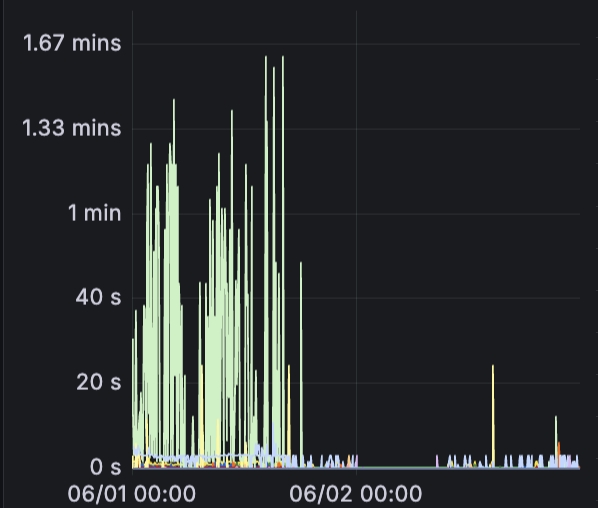
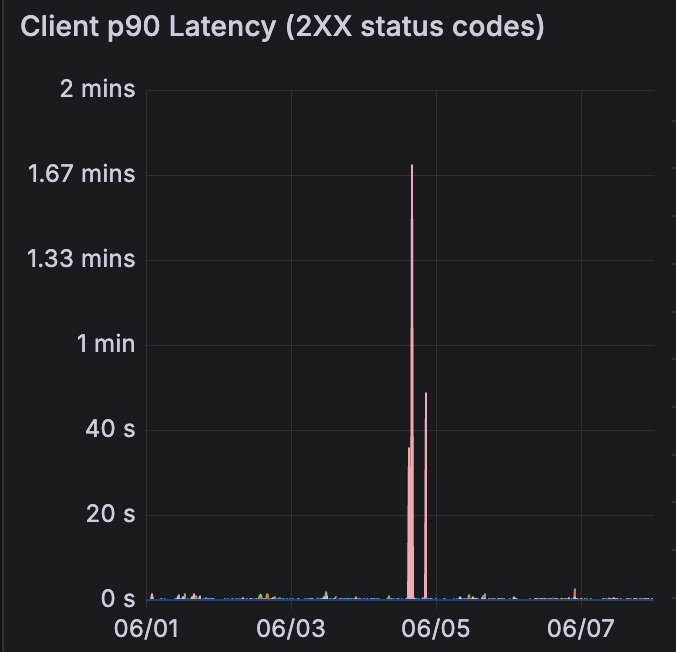
Two of our services reach the same CouchDB cluster by different routes:
service A ---> public endpoint ---> CDN ---> ALB ---> CouchDB
service B ---> internal load balancer --------------> CouchDB

  different client paths, but the same last hop,
  and so the same 8 KB window on CouchDB's socket
Service A, on the public path, spiked all day. The y-axis here is minutes:
Service B, on the internal path, sat near zero across the same week apart from two isolated spikes:
Someone Found This In 2018
Once we understood the mechanism, we went looking upstream. CouchDB issue #1409, filed June 2018:
Turns out the recbuf setting is the cause. I had to comment out the recbuf param in mochiweb/mochiweb_socket_server.erl and then the time to put a 10 MB text file went from 1 min 29 seconds to < 1 second
The MochiWeb issue that added the undefined escape hatch, #153, names the cause:
when an explicit RCVBUF is set on the socket under linux, this limits the maximum TCP window, which leads on a high latency link (200ms RTT) to very poor performance
Same bug, eight years earlier, and a good deal more painful for them because
their socket faced the client directly. The fix became CouchDB’s
{recbuf, undefined} default. We then wrote a server_options line about
connection counts and switched it back off.
It’s Not Just CouchDB
Any system that owns its TCP sockets makes this choice.
Kafka pins it. From SocketServerConfigs.java at 4.0.0:
public static final int SOCKET_RECEIVE_BUFFER_BYTES_DEFAULT = 100 * 1024;
public static final String SOCKET_RECEIVE_BUFFER_BYTES_DOC =
    "The SO_RCVBUF buffer of the socket server sockets. If the value is -1, the OS default will be used.";
100 KB by default, with -1 as the escape, documented as such. Kafka tuning guides tell you to raise it for cross-datacenter links, which is the same ceiling wearing a different hat.
PostgreSQL doesn’t pin it. In src/backend/libpq/pqcomm.c it sets TCP_NODELAY and SO_KEEPALIVE, then stops. No SO_RCVBUF anywhere on Linux. Its one send-buffer block is Windows-only, and the comment there says it well:
before fiddling with SO_SNDBUF, check if the current buffer size is already large enough and only increase it if necessary
| System | Ships SO_RCVBUF as | Escape hatch |
|---|---|---|
| PostgreSQL on Linux | never set | not needed |
| CouchDB 3.x default | {recbuf, undefined} | the default is the escape |
| CouchDB, key omitted | 8,192 pinned | {recbuf, undefined} |
| Kafka broker | 102,400 pinned | -1 |
What We Shipped
One tuple:
-server_options = [{backlog, 128}, {acceptor_pool_size, 16}, {max, 8192}]
+server_options = [{backlog, 128}, {acceptor_pool_size, 16}, {max, 8192}, {recbuf, 262144}]
8,192 bytes to 262,144. Thirty-two times the window, so a thirty-second of the round trips for the same body.
Should we have pinned it at all? Autotuned came within 2% of the 256 KB pin in our own benchmark, so {recbuf, undefined} would probably have done the same job and left no ceiling for a slower path to hit. What matters more is that 256 KB is a number sized against the documents we actually write.
Here is the same panel for Service A afterwards. Note the y-axis: it tops out at 14 seconds, where the earlier chart topped out at 1.67 minutes.
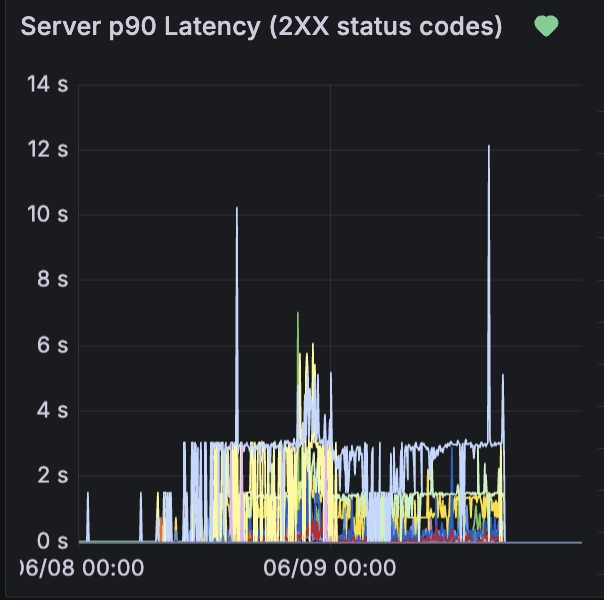
The ceiling dropped to 12.1 seconds, and the body of the distribution sits under 3.
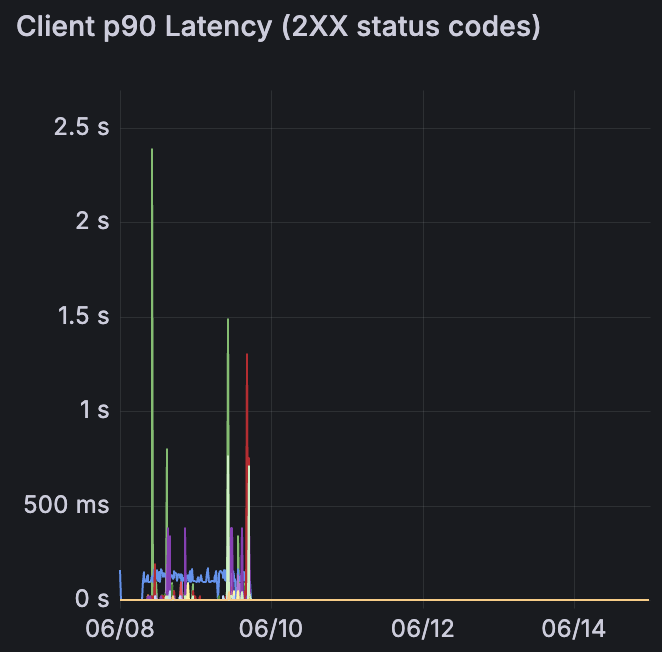
Service B improved too, even though the internal path had far less to gain. Its two minute-long spikes are gone, and after a couple of days it flatlines. Note the y-axis again: this one tops out at 2.5 seconds.
The Main Lesson
the same 8 KB window, three payloads

  11 KB    [][]                          2 round trips
  40 MB    [][][][][] ...            4,883 round trips
  100 MB   [][][][][] ...           12,208 round trips
recbuf decides how much of a request body can be in flight at once. How much that matters depends entirely on what you are writing.
For an 11 KB document, an 8 KB window is two round trips. For a 40 MB document, that’s 4,883 round trips with latencies up to 8 seconds. And on the 100 MB writes we benchmarked, it resulted in latencies up to 50 seconds.
So the number has to follow the payload. Our original config never did.
References
- CouchDB HTTP server options
- CouchDB 3.3.3
chttpd.erl, default server options - CouchDB issue #1409, slow PUT of large documents
- MochiWeb v3.2.0
mochiweb_socket_server.erl, the RECBUF_SIZE default - MochiWeb issue #153, allow no recbuf on socket
- Erlang
inetsocket options - Kafka
socket.receive.buffer.bytes - Kafka 4.0.0
SocketServerConfigs.java - PostgreSQL 17
src/backend/libpq/pqcomm.c