Published Apr 22, 2026 · 4 min read
Scaling CouchDB to 1 Million Requests Per Minute (Part 1)
A post where I detail the different challenges I've faced while scaling CouchDB.

I had the fortunate experience to solve reliability issues related to CouchDB. Where I’m working, it’s built into our core product which is the POS system itself. Under the hood, it’s basically a version of CouchDB rewritten in Dart — it’s open source btw.
I want to share some lessons I’ve learned while trying to scale CouchDB to reach 1 million requests per minute.
Overcoming EMFILE Error
We deployed CouchDB in EKS. This helps to easily upscale the nodes or downscale depending on the workload usage. For a database, that usually happens as the company grows.
But day 0 configurations often don’t hold up. Cracks will appear and in our case it was the EMFILE error.
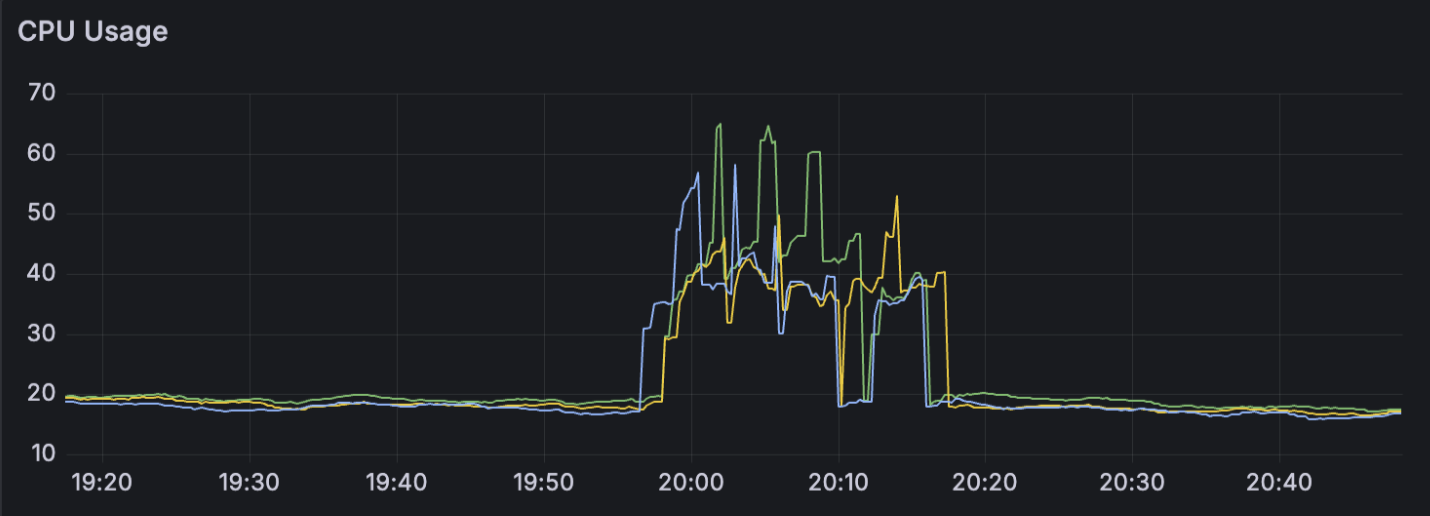
When the issue surfaced, our CouchDB started to lock up and latency was high. At the time, the hosted node was of type m7g.12xlarge so it had around 48vCPU—but how come it reported over 60 vCPU? At this point the database consumers was waiting for a response from CouchDB. Rather than waiting for it to recover, our kubernetes liveness probe initiated a restart for the affected pods. The degradation lasts around 10-15 minutes.
Other correlated metrics that we saw was the OS file descriptor and database opened metrics—there was a cutoff in the graph during the event.
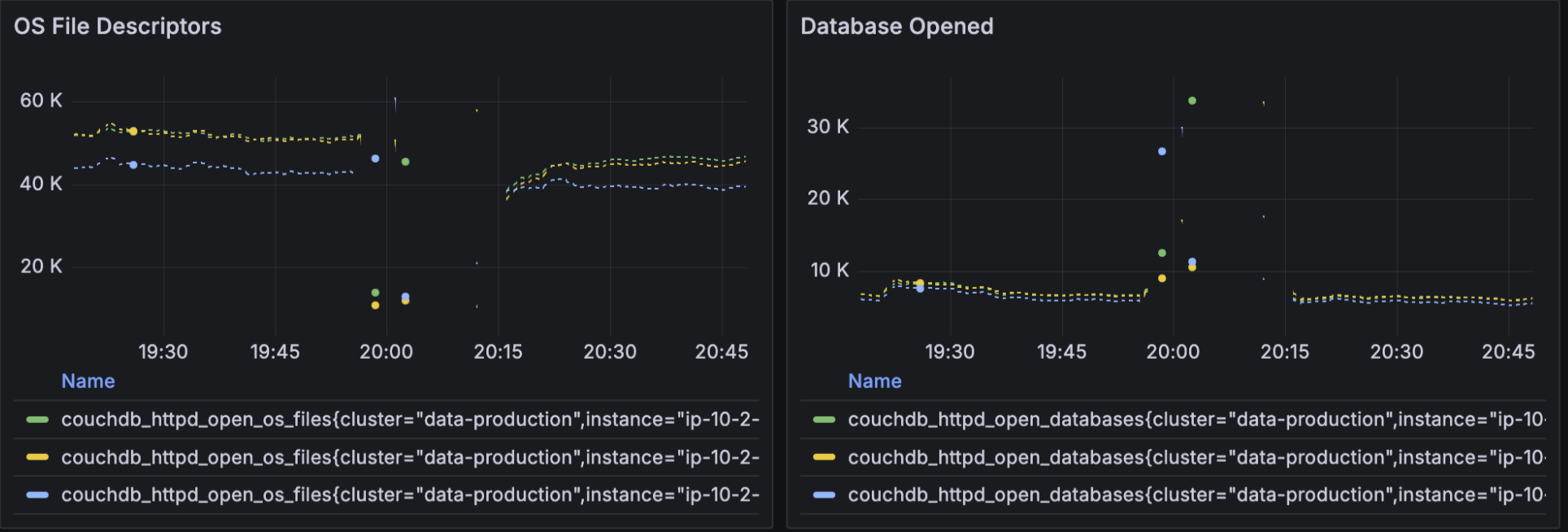
What really nailed down the investigation was the following logs:
{{case_clause,{error,emfile}},[{mem3_rep,go,1,[{file,"src/mem3_rep.erl"},{line,108}]},{mem3_sync,'-start_push_replication/1-fun-0-',2,[{file,"src/mem3_sync.erl"},{line,239}]}]}

[error] 2026-01-02T12:11:26.035407Z couchdb@XXX <XXX.XXX.XXX> -------- Could not open file ./data/shards/XXX-XXX/XXXX.couch: too many open files
EMFILE coupled with too many open files was enough for us to get an answer. When we check back our deployment configuration, we found that:
couchdbConfig:
  couchdb:
    max_dbs_open: 100000
In CouchDB, documents can be stored within a named database. After opening a database to read/write a document, it can hold on to it so subsequent operations don’t require further internal lookups, putting less strain on the database.
Here we see that the previous value set was 100k. And when we run the following:
-> ulimit -n
65536
Here is a breakdown of what that means:
-
ulimit (User Limit): This is a shell built-in command used to view or restrict the system resources available to the current shell and any processes started by it.
-
-n (Number): This specific flag targets the limit for open file descriptors.
The issue was that CouchDB operated as if it can hold onto 100k databases at once. And in Linux, everything is a file. This assumes the process could support 100k file descriptor and then some.
One thing about CouchDB is that it’s written in erlang. Under the hood, it implements the actor model. Every request entering CouchDB get its own “actor”, which also separately gets its own “mailbox” that it listen to and executes from. Fundamentally, it’s a concurrency paradigm native to Erlang.
The CPU metrics were using the following:
rate(container_cpu_usage_seconds_total)
It is taking a counter (total CPU seconds used) and calculating the rate of change over a small window of time (e.g., 1 minute).
So when the process was over the 65536 threshold:
-
The actor receives the EMFILE error. Because actors don’t handle catastrophic system errors, the actor immediately dies.
-
The Supervisor actor sees its worker just died. Its programmed job is to ensure the work gets done, so it instantly spawns a replacement actor to try the task again.
-
The new actor immediately tries to open the socket. The ulimit is still maxed out. The kernel rejects it. The new actor dies.
The CouchDB Erlang VM is now spawning, crashing, and garbage-collecting thousands of actors per millisecond.
Because the spike was so sudden and aggressive, the rate() function mathematically extrapolated that extremely steep slope. It went beyond the physical 48vCPU and calculated the over 60vCPU
Fix
So to prevent this from happening again:
- we raised the
ulimit -nthreshold to 100k via the container args by running
ulimit -n 100000 && exec /docker-entrypoint.sh couchdb
-
Lowered the
max_dbs_openfrom the previously set 100,000 value. -
Monitoring dashboard and automated alerts for the file descriptor utilization against the newly set
ulimit -n
Conclusion
It took me a while to understand how to maintain and make CouchDB reliable.
I’ve been burned by incorrect analysis and also investigations that led to nowhere. The one unlock I had was realizing how useful it was for me to use AI to learn how Erlang works internally—even diving into the codebase for me to understand the different code paths.
I hope this helps. This is only part 1 so I’ll definitely post more. Part 2 will be about how I used AI to export additional CouchDB metrics that weren’t available in other existing OSS solutions.